Part 1. Why I don't know how to build a website
Published 2025-02-25
Web development is a skill I've seemingly been avoiding for the past 10 years.
Before I entered college, the "development boot camp" boom was starting out. Local and international companies were hosting new bootcamps every month to get everyone started in the areas they required, mostly web development and QA. They would give free courses, train everyone in the basic tasks, hire the top 5% of students, and start the process again. This trend died down at around the time of the pandemic, but for the few years it was around, it was one of the best career choices you could make to get a well-paid job at a respectable company without a degree (with benefits like remote work, which wasn't that common at the time). Not everyone is cut-out to work in software, but many of my friends took this route and now are amazing professionals, working at the top of their fields.
I wanted to do Bioinformatics, and unfortunately for me there was no getting around a degree. Apparently companies need some guarantee that you know what you are doing before letting you mess around with other people's health. So I spent a few years working on it, learning the basics and then the not-so-basics of math, statistics, molecular biology, genetics, machine learning, modelling, and programming in C++.
Halfway through all that I ran into Python, and it messed up my brain. I fell in love with the language that had a library for everything, and suddenly most of my problems had simple-enough solution. Why spend a month learning how to solve a differential equation system by hand when you can solve it in 3 lines using Sympy? Why write the logic for a multilayer perceptron in MATLAB of all things, when you can install Keras and have it working in three sentences?
Of course, the questions are only rhetorical. Someone had written Sympy, and Keras, and everything else I was using, and the point of the degree was to give me the skills to be that person If I wanted to. I was trained not to just use the standard tools used in bioinformatics, but to be able to write them myself, and that's what I did once I graduated.
"Lo atamos con alambre " UI.
Being able to tell the difference between the times where you can and can't take a shortcut is one of the most valuable skills I developed. Sometimes you need to learn how something works, understand it's flaws and limitations, and build a better tool that completes the task in the best, most optimal way. Other times you just need the damn thing done, get a good enough result and move on to something else.
UI, for me, was always a means to an end. When it came time to show my work, libraries like streamlit were a godsent, where I could build a simple, good looking app in 15 lines, get my results out there, and have users test them. I knew that more work was needed to get a "Real" UI working, but since my job was not building the UI but the things that make the UI necessary, I avoided putting in the work like the plague.
I tried to learn web development many times before, but always with the same results. To me, HTML, CSS and Javascript were three whole new languages that I needed to learn to start building websites, and I was too busy learning all the other stuff that put food on my table. To make things worse, no one builds websites using the basics of the programming language, they use libraries (libraries so large they call them frameworks), just like I do in Python. But no matter how I approached it, all I got to show for my effords were either ugly, old, 2000s looking websites, or carbon copies of tutorials that I didn't really understand how they worked.
The other issue was that for me, learning Python was had a more clear, straighforward path. After you learn how to assign a variable and use a for loop, you can ask yourself "What do i want to do with this", and find a library yo do so. You need computer vision? Use OpenCV. Do you want to do deep learning? Import pytorch. Working with tables? Pandas. Need a plot? Plotly. Of course it isn't that straightforward, there's polars instead of pandas, matplotlib instead of plotly, and tensorflow instead of pytorch if you worked at Google and are forced to use it. But we have go-tos, where you can't go wrong. You can get the core functionality out of those libraries with three lines of code, see if you like them and swap them around otherwise.
But from an outsiders perspective, it seems like those damn web developers can't get their act together! My issue with web was always the commitment. You can't just switch frameworks halfway through, you might as well switch from learning Spanish to Italian, yeah it's easier to learn one after you know the other, but if you are starting out you will only get more confused. Every time I started the process of learning it started with 15-40 unknown boiler plate files and a 40-hour course on top of the three new languages and auxiliary libraries (just npm install these!), just to get a hello world equivalent.
So, this is my attempt at getting around to it. This personal website of mine is just an excuse to learn how to do the damn thing, see what I like, what I don't' and document the process for the next person that comes after me. I'm writing this first post in a word document before even creating the repo, so If you are reading this, I don't know how good or bad the website you are on is, but I'm glad you are reading it.
2. Choosing a technology
Published 2025-03-01
If you make the mistake of googling or searching on YouTube, choosing a web stack seems to be one of the most important decisions you could make in your lifetime. Forget about your career, your spouse or where to live: this is the big one. As an outsider, there seems to be more web frameworks that atoms in the known universe, and everyone has very different, strong opinions on how you should build a website.
After much searching around and listening to many of their arguments, I humbly and wholeheartedly disagree with the underlying premise. If you are starting out, I don't think that it hardly matters at all. My ignorant take is that unless you are a company the size of google, where your decision will turn the fate of 100s of developers, for 95% of the websites out there you can use whatever you feel like. If it works and it looks decently nice, the user won't care (This applies to many different things, but I won't get into it) and you are incredibly unlikely to run into the limitations of any platform for at least a few years after you learn how to declare your first variable. Getting started at all is more important.
I still have to choose though, so this was my criteria:
It can't be to niche. If I learned anything from my time working in Bioinformatics is that being able to google your problem, really matters. It's the difference between spending 10 minutes troubleshooting something vs 10 hours. Between the calming feeling of realization with a "Oh, that was the mistake, now I get it" to yelling at the wall "They could have made the fucking thing more clear, eh?" when you finally find the missing docstring in a deprecated branch of the repository, or the package author explaining how the parameters really work in a 15 year old email list. I'm down to try to cool new thing on my own time, but if I need stuff to work, I want it to just work.
The less code, the better. That's almost always true. Writing simple, straightforward code makes your projects easier to read, better to maintain and faster to iterate over. Large repositories should be large due to the complexity of the task, and nothing else.
The less dependencies, the better. This is not always true, but it is when learning something new. I don't really care if I end up using 20 different libraries in one python file, but the difference is that I already know python. I can quickly tell if the error is mine or external, and when It's my fault, quickly correct it. It's easier to learn one thing at the time, and when you don't even know how to write a function in this brand-new programming language, it becomes really hard to understand where the language ends and a library begins. You are always better off learning 1 new thing at the time.
The goals define the tools and Good enough is enough. I am a bioinformatician and data scientist first, so making websites is not my job and never will be. Most of my needs are covered if I can build a modern looking UI with some responsive user inputs, display good looking data charts, probably a table, maybe authentication. My product is not the website but the thing that lives underneath it, so unlike other technologies I've learnt before, it is not critical for me to become an expert at this.
There must still be a learning path. I mean, I just said that I don't care for web development, but that may not always be the case, right? So ideally, I find a learning path that allows me to add more tools on top, progressively, as I master the ones I am using.
Decision paralysis was a thing. I asked around and got a ton of different answers, and none convinced me. At times it felt like choosing a job, since whatever I chose would dictate how I would spend a non-trivial amount of time. In the end, I ignored most of my friends' suggestions and ended with what I thought would be best for me to start with.
The first version of this blog was finally built using FastAPI, HTMX and Bootstrap.
3. The learning path
Published 2025-03-07
So! Hopefully my tech decision didn't upset you. Let me try to guide you how it went.
The failed attempts.
At first I thought I wanted to build a project that could eventually turn into a phone app. That, apparently, It's a whooole other thing.
Angular, React and Flutter are the three tools that were suggested to me the most. Flutter was build for multiplatform, but apparently the desktop versions suffer a bit, and I'm mostly a desktop guy. React could be turned into React Native and ported to a phone app, but the internet didn't seem completely sold on that being a good thing. Angular was strongly oppinioned (whatever that means), used TypeScript (which I find really attractive, the thing I miss the most from C++ is having strongly typed objects) and seemed just as powerful, while streamlined.
I went with Angular. I purchased the highly recommended McMillian course on Udemy (which was really good, and I will probably go back to it at some point) and got started. But I ran into that "Who knows where the language ends and the library begins" issue I described in another post. I don't vibe with JavaScript yet, so It is not clear to me if I'm learning Javascript, TypeScript or Angular.
Halfway through the course I started to watch Jeremy Howard's talks and courses for an unrelated reason, and I stumbled into this new project of his called FASTHTML. In summary it allows you to write everything in python, essentially never leaving the backend. Cool project, but it clearly still needed me to know what was going on under the hood anyway (to my untrained eye it's CSS and HTML syntax in a Python file), and at this point I don't know what the heck a div is, no matter the language I'm writing on. He also featured MonsterUI, a project build on top of FastHTML (and HTMX) that abstracted everything even more, and I got a website running with it in 20 minutes using a single file, but then I was again back to where I started! Relying on a tool like streamlit to run away from learning the fundamentals.
It was around this time that I wrote by previous blog entry, and realized that my requirements are not as complex as those of a bank, or facebook, or anyone else. So, I readjusted my goals: My proof of concept was going to be this very blog, a basic website where I could publish some notes written in markdown. Then, to consider this trip down web development lane completed I wanted to fully replace my streamlit applications. For those unaware, that would mean:
- Good feeling user inputs, including the ability to upload files
- Embedding plotly (or python based) charts
- Rudimentary user authentication
- Have it not suck
The new approach
Refocused, I went back to reading a bit more. The main conclusions I took from my googling and youtubing were: (disclaimer: all may be wrong)
There is no escaping HTML. Everything is HTML. It is the very building block of the web, and whatever fancy framework you are using it all compiles down to HTML in the end.
CSS is what makes the website look nice. And it's not as simple to make them look pretty as I thought it was. Once again everything turns into CSS in the end. However, you may avoid writing CSS by using a library to abstract it away as much as you want. For example, bootstrap -> Tailwind -> CSS
JavaScript gave the web it's potential to replace most desktop applications and is used everywhere for most things. It is undoubtedly useful and important. Everything cool about the web started once we got Javascript running in our browsers. And I don't really vibe with it.
JavaScript is what killed my previous attempts every time. I get why it's needed, I understand it's usefulness, but it's way overkill for my needs. Frontend frameworks were built to make the websites that made desktop applications pointless. Today you can use Photoshop, Microsoft Office, Google Earth and even play Quake in your browser, and that's great. But I am not looking to make any of those things, I just need a white canvas with some plots, and for that, most of the frameworks look to me like shooting an ant with a bazooka.
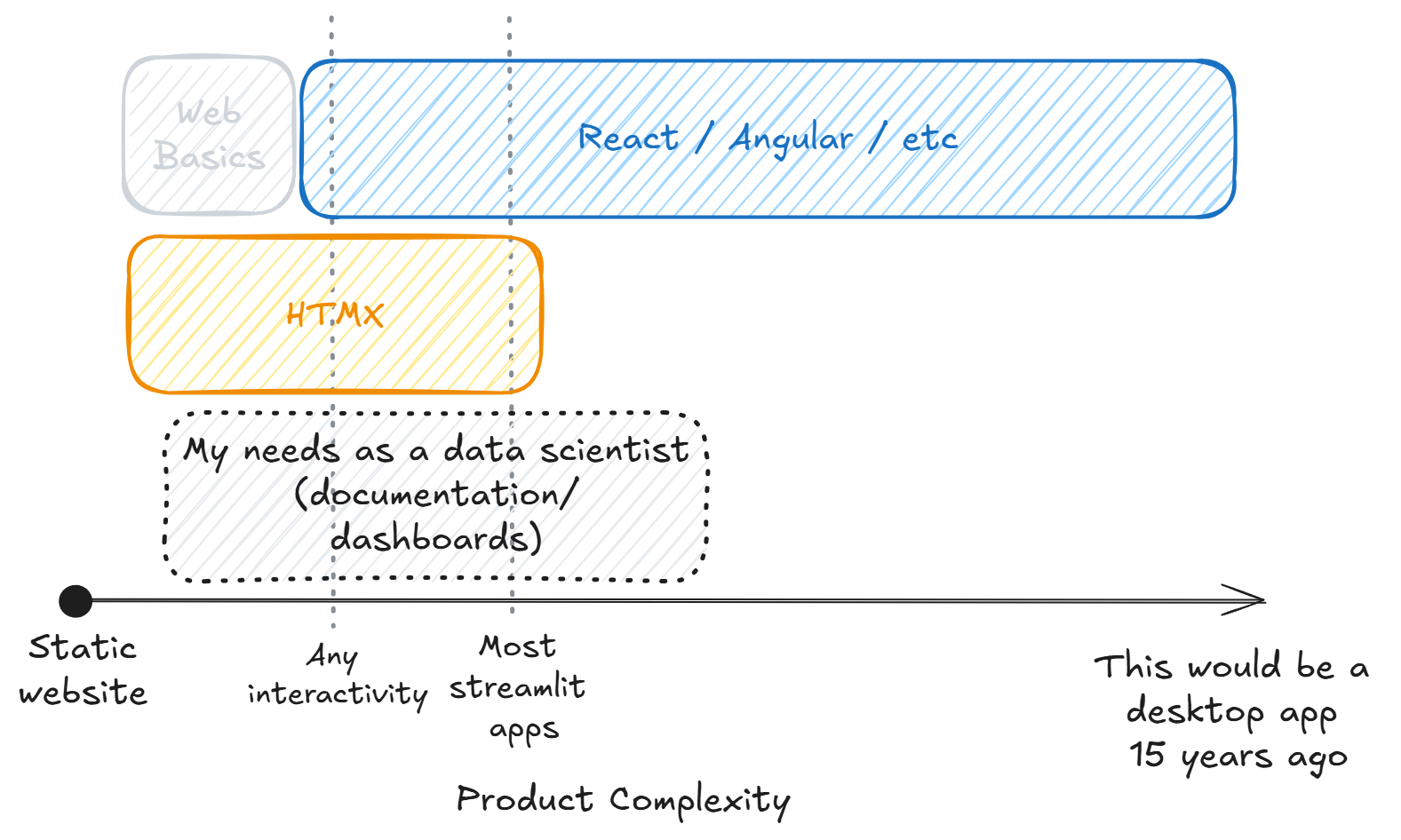
Plot shamelessly stolen from theo.gg
That's where HTMX came to the rescue for me. It supercharged HTML with the most basic modern functionality: It allowed my humble website to update without flashbanging you with a full page refresh, and that allowed me to mess around with HTML and CSS, while postponing the inevitable JavaScripting for a little bit longer. (It seems to be able to do a lot more things, but after checking that plotly charts automatically export themselves to plain HTML, I was sold).
I could get started with FastAPI, the most basic of basic APIs for the backend, and get a simple website up. Learn how to deploy the thing, properly connect to a database, and focus on writing and creating some content. It also gave me an upgrade path, to switch from FastAPI to Django, from Bootstrap to Tailwind, and then yes, whenever my projects start getting more ambitious I will go back to that Angular course and finally learn how to properly build a website.
That is, unless you undecisive lot decide to reinvent the wheel again. Who knows.
Web 4. The first website
Published 2025-03-11
So! You are new like me and would like know how it went. In case you are a data scientist reading this from the outside, here is a short version of how everything works, the short blog I wished i stumbled upon before.
I got started with HTML/HTMX by watching a few random youtube videos to get the general concepts, and then getting hands on replicating this simple site step by step. If you are on the same boat as me I suggest you do the same, and take this short post as an overview of what you will be doing. (This Python and this general repo have a lot of material that you can follow if you start at a slighly different place than me). Also, you know, read the docs and ask your friendly neighbourhood LLM for help when you get stuck.
Side tangent: Always read the docs first. If what you are using doesen't have good docs, stop using it. If you can't get it working from following the "Getting started!" tutorial in the docs, stop using it: you are doomed, run away. No LLM will make it better, The LLM is also trying to read the docs, and there are none. Other humans won't be of any help either, they don't have docs, and even if they can solve your problem, they should not. They should be warning you to stay away, don't bother, don't get in here, there are no docs.
Moving along. What we are building is a basic backend built in FastAPI that will return HTML to our browser. HTMX will help us make API calls that not refresh our whole page so it feels more modern, and Bootstrap will make everything look a little bit nicer.
If you know anything about web development, I'm guessing that reads as me avoiding using any big-boy tools. You are correct. I am trying to leverage the tools I already know (Python and FastAPI) and incorporate new technologies one at the time (the plan is to first learn HTML, then CSS, then switch to better tools). I want to produce a POC with as little code as possible, where I understand what everything does, before making the project any bigger than it needs to be.
Getting started
FastAPI is one of the easiest libraries to learn if you need to get started with python. You essentially write endpoints as functions and define the response as return values. Here is a simple main.py example:
from fastapi import FastAPI
app = FastAPI()

@app.get("/")
def root():
    return {"Hello": "World"}
Now start the server with fastapi dev main.py and just like that, you now have a working API. Access the correct route, and you will receive whatever object or value you define.
What we need to do is make the return value an HTML object so our browser can render it. HTML is easy to pick up at first (and then it gets weird), with a few caveats that took me way too long to understand. The most basics are:
- The head is just metadata stuff that will not get rendered directly, so:
- Anything you actually want in the page has to be in the body
So we can write a basic placeholder page and add it to the response object.
<!DOCTYPE html>
<head>
    <title>Basic HTML Page</title>
</head>
<body>
    <h1>Welcome to My Page</h1>
    <p>This is a simple HTML file with a header and body.</p>
</body>
</html>
And make the endpoint return this file instead of the hello world.
@app.get("/", response_class=HTMLResponse)
async def read_root():
    with open("index.html", "r", encoding="utf-8") as file:
        content = file.read()
    return HTMLResponse(content)
We now have an ugly looking static website. Drumroll please...
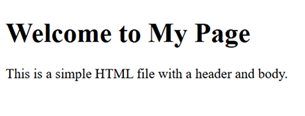
This is where I stopped every time I tried to start learning web development. The result is ugly and it usually took me a while to get here. It involved me having to use some uncomfortable big frameworks and libraries, with a large codebase I mostly didn't understand or know what it was for (Ever started a project on ruby? Neither have I, but I find it hilarious). Instead, I now have two files and maybe 30 lines of code.
So, the three main questions we want to be able to solve quickly, before we lose interest are:
- How do I make it more useful.
- How do I make this prettier
- How do I make feel modern
Make it more useful
First, make more endpoints for more pages. My goal was to have a landing page and a blog, so that's at least two routes that I want to build. We also want to start using a templating library to make all this HTML-ing a little more modular and dynamic.
Instead of rewriting everything from the beginning for our new page, we can create an inheritance type-thing by writing "templates" which to me translate to "modular blocks of HTML". Using a templating library you can stich them together to avoid having to rewrite stuff. So, we can have a base template with our headers or sidebars, and have our landing page and blog page inherit from them with this simple syntax.
We can write a basic template _base.html like:
<head>Your head stuff here</head>
<body>
    {% block content %}
    {% endblock %}
</body>
</html>
And now every new page can be written as:
{% extends "_base.html" %}
{% block content %}
    <body> This page's content </body>
{% endblock %}
Making it pretty
It turns out making a good looking website is way harder than I was expecting it to be! You essentially need to explicitly tell every single object how you want it to look. CSS is the tool for this, but if you write it inline like some tutorials tell you to, you quickly make your codebase a lot more complicated than before. The standard seems to be to write .css files that define how each object looks like, name your custom classes, and make your HTML object use them. I started doing it by hand, and it gave me really bad 'You'll spend your life here' vibe, so I stopped and looked for something more practical.
Tailwind is a library thingy that makes applying these standard styles little easier by having shorthands for common CSS expressions. I started to use it for a while, and it was easier to use than plain CSS, but it still made the HTML a little bit too crowded for my taste, and I had too much power in my hands. It felt like opening Photoshop for the first time, I didn't really know what the options were, I don't have a sense of style, and without a clear plan on what to create I was lost.
I finally settled for Bootstrap, a well-known library with prebuilt classes that my HTML object can inherit to give it a predefined style. It made everything look nice enough during prototyping that It didn't actively hurt to look at, and it didn't infest my HTML too much, so hopefully it's simpler to migrate out of lately. It also has a nice library of examples to look at, so you can just pluck elements out of the docs and implement them easily (streamlit style). The most useful feature for me is the build-in grid, so I could place a sidebar to select blogposts without much hassle.
My short time testing Bootstrap's alternatives helped me understand what it's doing for me. In my opinion, the issue with using high level abstractions when learning is that you don't know what you are abstracting out, so when something stops working for you, you are completely lost and you might as well start learning from 0. I am glad that I started by understanding the basics of CSS first, and I am aware that I will eventually have to go back to something more granular, but for what it's worth, I'm happy with my learning path.
Courtesy of an LLM, here is the same element rewritten in all three options:
<!-- Bootstrap -->
<button class="btn btn-primary">Click me</button>

<!-- Tailwind -->
<button class="bg-blue-500 hover:bg-blue-700 text-white font-bold py-2 px-4 rounded">Click me</button>

<!-- CSS -->
<button style="
    background-color: #0d6efd;
    color: white;
    padding: 8px 16px;
    border: none;
    border-radius: 4px;
    font-weight: 600;
"> Click me
</button>
Making it feel modern
Here is where HTMX comes in. After building two pages, adding a navigation bar and link to a few sample blogposts, the basics were there. However, when you click a button in vainilla HTML you issue a GET request and recieve a whole new page. Modern websites don't work like that anymore. You usually just want a section of a page to update, not to get flash banged with a stutter on every interaction.
HTMX lets you do just that. Inside any element you can indicate when to issue a request, to what endpoint, and where to place the returned HTML. This lets you swap elements on the fly, as your endpoints can now return fractions of HTML instead of whole pages. Here is the code that powers the buttons on the sidebar for my blog (without the boostrap for clarity), swapping the main body of a page for the correct blogpost, without reloads.
{% for entry in entries %}
    <button
        hx-get="/blog/blogpost?path=website/{{ entry.path }}"
        hx-target="#blog-content"
        hx-swap="innerHTML"
        hx-push-url="false">
    {{ entry.title }}
    </button>
{% endfor %}
<div class="#blog-content"><div>
This essentially says "Whenever someone clicks you, issue a GET request to /blog/blogpost/ and replace the #blog-content div with whatever you recieve". The endpoint, if you are interested, goes:
@router.get('/blog/blogpost')
def blogpost(request: Request, path: str):
    if request.headers.get("HX-Request"):
        with open(f'{path}.md', 'r') as f:
            md_content = f.read()
            content = markdown.markdown(md_content)
            return templates.TemplateResponse('blogpost.html', {"request": request, "content": content})
And blogpost.html only has {{ content|safe }} inside
Once again, this was really fun for me, as it forced me to understand the basics of HTML a lot more that I would have otherwise, since I was interacting with it a lot more directly.
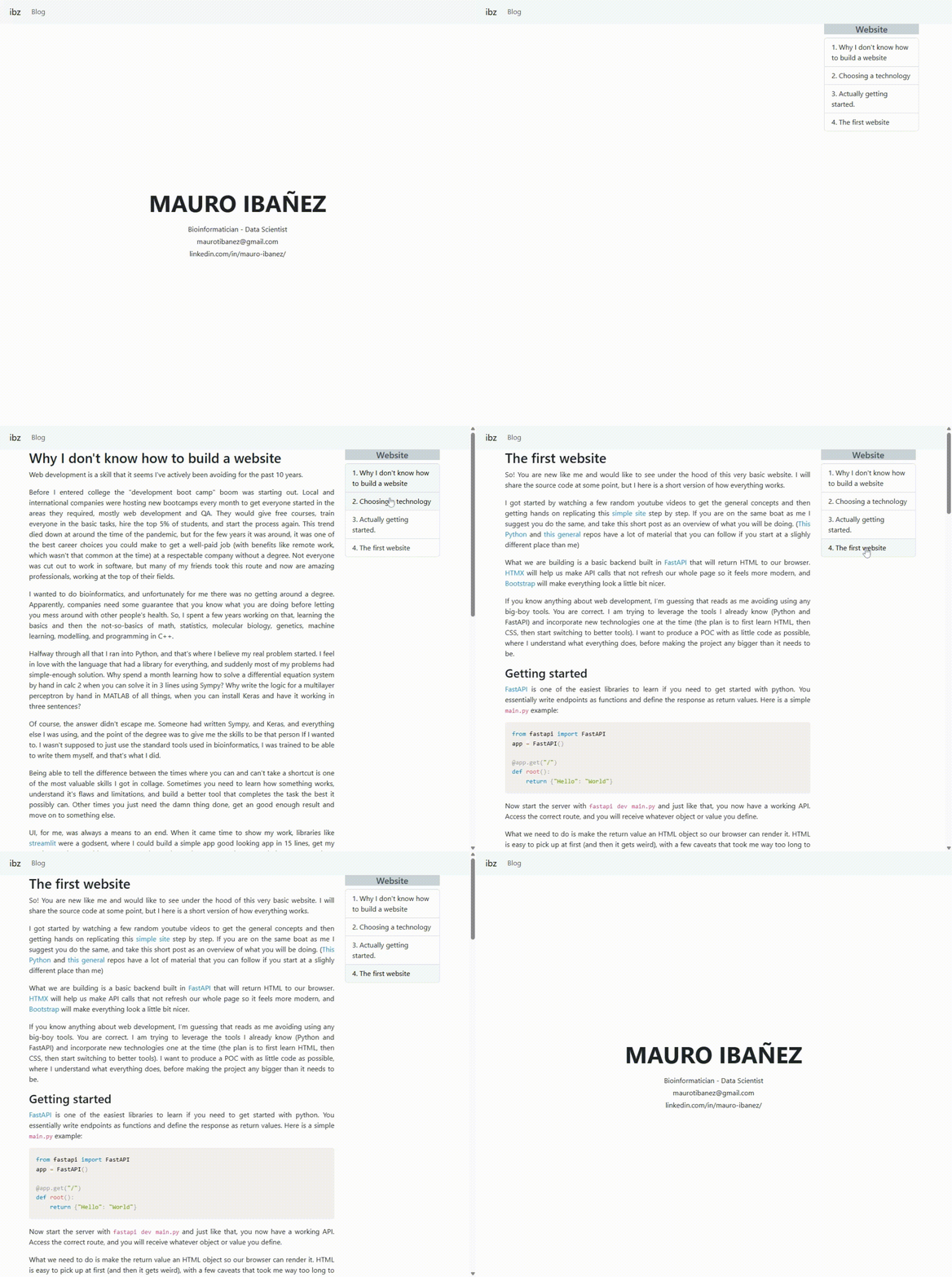
That's pretty much it. The content of my site are a few markdown files, three endpoints and 5 HTML files. Underwhelming? Maybe, but it completely fulfils my needs. I feel like I have the basics down, I understand every line of code and know how to make it better in any way that I want to, so honestly, I couldn't be happier.
Postscript
Published 2026-03-29
As time went by, I got slightly more acquainted with JavaScript and the inner workings of some traditional frameworks. Hands-on experience is the best teacher for programming, which, like real languages, is a use-it-or-lose-it skill that's hard to properly measure unless you get some real-world practice. What helped me the most was joining a new startup, which already had a website in place but no official maintainer, so I got the chance to experiment with new tools in a more meaningful environment than my zero-views website.
The other thing that has changed since the beginnings of this blog is the capabilities of LLMs when it comes to code. When I started navigating these websites, "agents" were still a new word. I was using LLMs in my IDE mostly as a code monkey, not as real part-time software developer. Today, you can ask Claude to build you this exact website (and many others much, much more complex) practically for free, and without having to validate a single line of logic. They've turned code into a commodity and removed my need to become proficient at CSS, JavaScript, and all the other things I complained about during this blog.
My thoughts about this are complex, so I will leave them for another day. I just want to say that I am leaving these entries published, not because they are a great tutorial on how to learn web development (they're not, they are the ramblings of a man who avoided doing such a thing at all costs), but because they can serve as an example of how to approach complex new topics.
It boils down to this:
Feeling uncomfortable is part of learning. The trick is to keep that discomfort at an almost-unbearable level. Spend too much time doing the same thing over and over, and you will stop feeling fulfillment. Take on a task you don’t even know how to start, and you will probably become overwhelmed and quit.
There is a fine line between feeling at home in what you are doing, and feeling completely out of your depth. Find that edge, stand on it, and stay there until you start to feel comfortable again. Then, take another step and force yourself to feel uncomfortable again. That is how you make progress.